
Statistics and Dashboard in a cPanel
[ad_1]
Here we will be discussing about the cPanel statistics and the dashboard along with few examples and screenshots to make your understanding better.
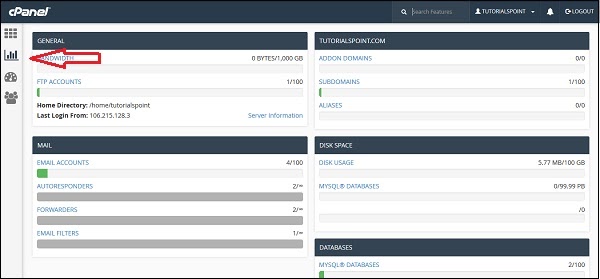
General option - It will be showing the amount of bandwidth which is allotted to the account and also the amount of bandwidth which has been used by you. It will also be showing the FTP accounts which is available in the cPanel account. It will also show the information of the home directory as well as the IP address, from where you have logged in for the last time. You will be able to click on the server information so as to view the detailed information of the server.
Domain Name Info - In the next provided box you will be able to show the information of the main domain and the number of add-on domains, subdomains and the aliases that you have created.
Mailing Information - This is the section which will be showing the information about the emails. It will also be telling you how many email accounts and filters that you have created along with the number of resources that has been allotted.
Disk Space - In this section the total disk space of the account will be shown and it will also show the amount of space that has been allotted in the account and the database.
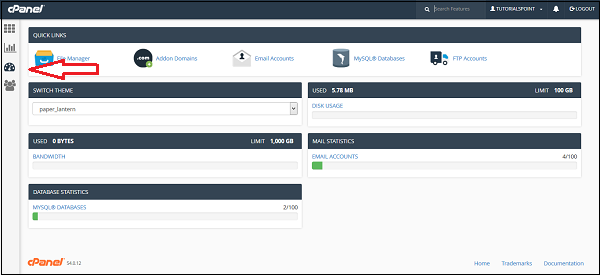
 cPanel Dashboard - Through this interface you will be able to see the brief statistics of the account as well as you can change the theme of the cPanel account. For accessing the dashboard you will have to click on the third dashboard of the left sidebar.
[ad_2]
Here we will be discussing about the cPanel statistics and the dashboard along with few examples and screenshots to make your understanding better.
Statistics in cPanel
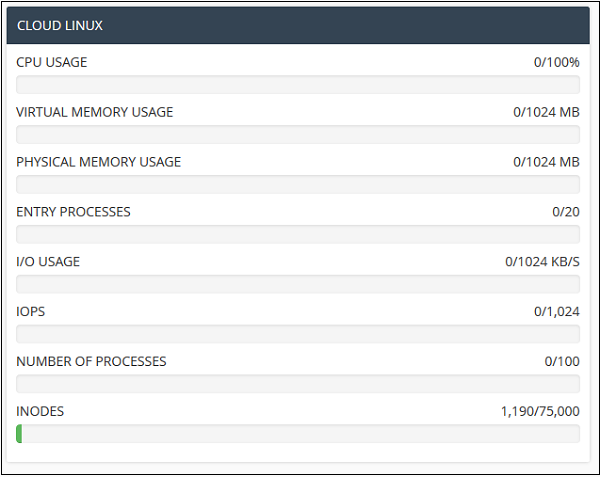
The statistic interface of a cPanel shows a quick interface of the cPanel account. It includes many types of information as it has been shown below. To view the statistics of the cPanel account you need to click on the second icon statistics from the sidebar which is at the left. You will be finding the information in cPanel statistics.
General option - It will be showing the amount of bandwidth which is allotted to the account and also the amount of bandwidth which has been used by you. It will also be showing the FTP accounts which is available in the cPanel account. It will also show the information of the home directory as well as the IP address, from where you have logged in for the last time. You will be able to click on the server information so as to view the detailed information of the server.
Domain Name Info - In the next provided box you will be able to show the information of the main domain and the number of add-on domains, subdomains and the aliases that you have created.
Mailing Information - This is the section which will be showing the information about the emails. It will also be telling you how many email accounts and filters that you have created along with the number of resources that has been allotted.
Disk Space - In this section the total disk space of the account will be shown and it will also show the amount of space that has been allotted in the account and the database.
cPanel Dashboard - Through this interface you will be able to see the brief statistics of the account as well as you can change the theme of the cPanel account. For accessing the dashboard you will have to click on the third dashboard of the left sidebar.
[ad_2]
Advertisement