
Outlook E-Mail Configuration
[ad_1]
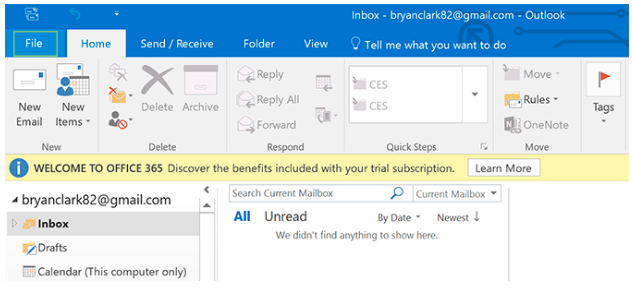
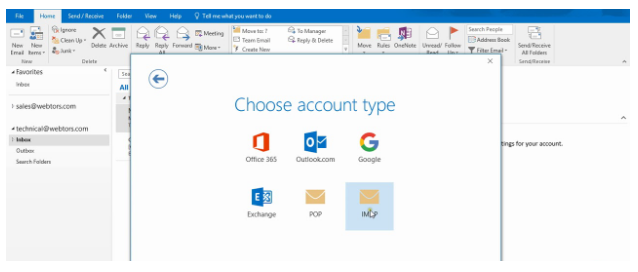
Step 1: Open Outlook and select File > Account Settings > Account Settings.Step 2: click the Add Account option to configure the new email account.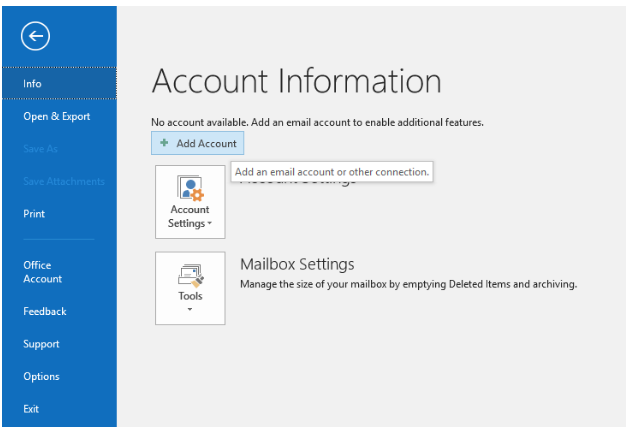 Step 3: Select the method of the configuration of your email account IMAP or POP.IMAP: The Internet Message Access Protocol (IMAP) is a mail protocol used for accessing email on a remote web server from a local client. From IMAP is not download to your local computer once you delete the mail from your local computer it’s deleted from the server also. POP: Post Office Protocol version 3 (POP3) is a standard mail protocol used to receive emails from a remote server to a local email client. POP3 allows you to download email messages on your local computer and read them even when you are offline.
 Step 4: Provide the proper login details and incoming and outgoing mail service.Non SSL email settingsThe following settings are not Secure settings. Use this only if you cannot use the SSL settings. Otherwise, you will want to use the SSL setup. Note that you will need to change "example.com" to your domain name.Email Address: Your full e-mail address
Incoming Server: mail.yourdomainname
Outgoing Server: mail.yourdomainname
Username: Your full e-mail address
Password: Your e-mail account password
Incoming Port: POP3 110 or IMAP 143
Outgoing Mail server (SMTP) Port: 587
SSL: NO
SMTP Authentication Required
Secure Authentication or SPA needs to be turned offSSL email settingsBelow is an example of the recommended Secure settings. The SSL (Secure Sockets Layer) protocol is for connecting to your server securely to prevent network "snoopers" from seeing your data over the network connection.Email Address: Your full e-mail address
Incoming Server: mail.yourdomainname
Outgoing Server: mail.yourdomainname
Username: Your full e-mail address
Password: Your e-mail account password
Incoming Port: POP3 995 or IMAP 993
Outgoing Mail server (SMTP) Port: 465
SSL: YES
SMTP Authentication RequiredSecure Authentication or SPA needs to be turned off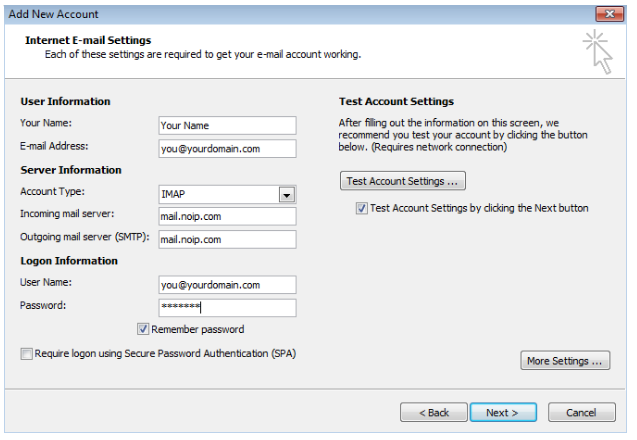 Step 5 : Once all the login credential updated the properly and click the More settings on the right side croner .
 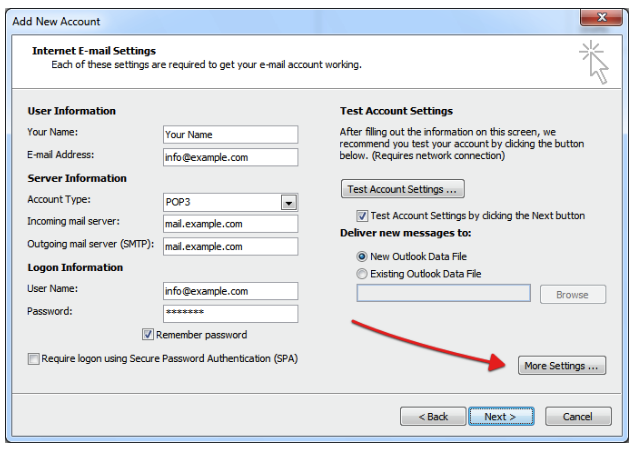 Step 6: Click the Outgoing server section and select the My outgoing server (SMTP) requires authentication.Step 7: Click the Advanced section. Then provide Incoming server Port number respective POP3 or IMAP and Outgoing server Port number respective SMTP.NOTE: Click the check box Leave a copy of messages on the server. After the configuration completed. All the email is transferred to the local computer If you want one more copy of the mail clicks the checkbox. In case disk space not sufficient for the emails then you uncheck that option.
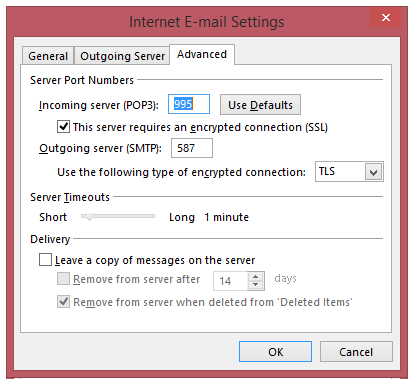 Step 8: Click the OK button and then Click on the NEXT option.Step 9: At last click on finish option.
[ad_2]
Step 1: Open Outlook and select File > Account Settings > Account Settings.
Step 2: click the Add Account option to configure the new email account.Step 3: Select the method of the configuration of your email account IMAP or POP.IMAP: The Internet Message Access Protocol (IMAP) is a mail protocol used for accessing email on a remote web server from a local client. From IMAP is not download to your local computer once you delete the mail from your local computer it’s deleted from the server also. POP: Post Office Protocol version 3 (POP3) is a standard mail protocol used to receive emails from a remote server to a local email client. POP3 allows you to download email messages on your local computer and read them even when you are offline.Step 4: Provide the proper login details and incoming and outgoing mail service.Non SSL email settingsThe following settings are not Secure settings. Use this only if you cannot use the SSL settings. Otherwise, you will want to use the SSL setup. Note that you will need to change "example.com" to your domain name.Email Address: Your full e-mail address Incoming Server: mail.yourdomainname
Outgoing Server: mail.yourdomainname
Username: Your full e-mail address
Password: Your e-mail account password
Incoming Port: POP3 110 or IMAP 143
Outgoing Mail server (SMTP) Port: 587
SSL: NO
SMTP Authentication Required
Secure Authentication or SPA needs to be turned offSSL email settingsBelow is an example of the recommended Secure settings. The SSL (Secure Sockets Layer) protocol is for connecting to your server securely to prevent network "snoopers" from seeing your data over the network connection.Email Address: Your full e-mail address
Incoming Server: mail.yourdomainname
Outgoing Server: mail.yourdomainname
Username: Your full e-mail address
Password: Your e-mail account password
Incoming Port: POP3 995 or IMAP 993
Outgoing Mail server (SMTP) Port: 465
SSL: YES
SMTP Authentication RequiredSecure Authentication or SPA needs to be turned off
Step 5 : Once all the login credential updated the properly and click the More settings on the right side croner . Step 6: Click the Outgoing server section and select the My outgoing server (SMTP) requires authentication.Step 7: Click the Advanced section. Then provide Incoming server Port number respective POP3 or IMAP and Outgoing server Port number respective SMTP.NOTE: Click the check box Leave a copy of messages on the server. After the configuration completed. All the email is transferred to the local computer If you want one more copy of the mail clicks the checkbox. In case disk space not sufficient for the emails then you uncheck that option. Step 7: Click the Advanced section. Then provide Incoming server Port number respective POP3 or IMAP and Outgoing server Port number respective SMTP.NOTE: Click the check box Leave a copy of messages on the server. After the configuration completed. All the email is transferred to the local computer If you want one more copy of the mail clicks the checkbox. In case disk space not sufficient for the emails then you uncheck that option.Step 8: Click the OK button and then Click on the NEXT option.Step 9: At last click on finish option.
[ad_2]
Advertisement