
Linux Hosting - cPanel Images
[ad_1]
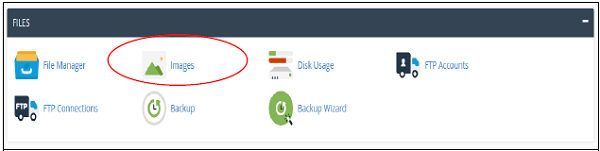
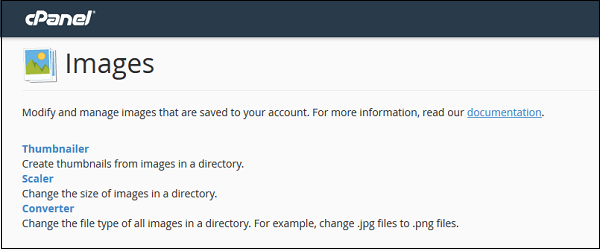
With this feature in a cPanel, you will be able to manage and modify the images directly through the interface. The images should be uploaded to the account to use this feature. For accessing the cPanel images, you need to click the images link which is found in the files.
This feature includes some of the following tools
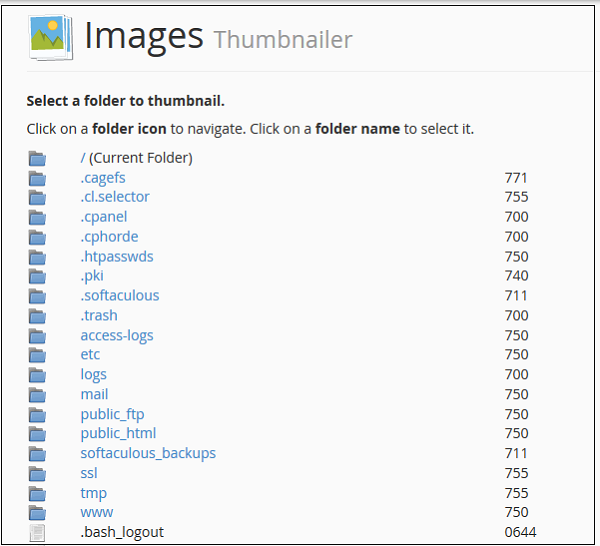 Navigation to the desired directory from which you wish to create the thumbnails, for navigation purposes use the folder icon the left side.
Choose the folder from which you wish to create the thumbnails, just by clicking on the name of the folder which is displayed in the middle.
The text inputs enter the percentage by which you would like to shrink the images. You need to keep the aspect ratio so as to maintain the original proportion of the image.
Navigation to the desired directory from which you wish to create the thumbnails, for navigation purposes use the folder icon the left side.
Choose the folder from which you wish to create the thumbnails, just by clicking on the name of the folder which is displayed in the middle.
The text inputs enter the percentage by which you would like to shrink the images. You need to keep the aspect ratio so as to maintain the original proportion of the image.
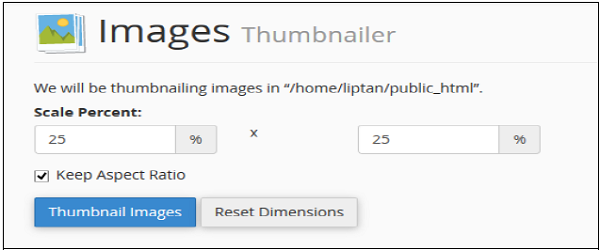 4. Finally, you need to click on the thumbnail images so as to create the thumbnails.
Here the system will be automatically creating the thumbnails into the selected folder here all the files in that particular folder will be converted.If you are looking best Linux based hosting solution for your website/business then you are at right place. Because HostingSewa is Nepal's #1 hosting provider with years of experience in providing expertize hosting solution for our customer. Since you are looking for information Linux Hosting solution- we do provide Linux hosting at an affordable price with amazing features, offers and discounts. Using our Linux hosting you can easily handle and manage your website. We also provide 99.9% server uptime with 24/7 customer support via phone, chat, email and ticket system.
4. Finally, you need to click on the thumbnail images so as to create the thumbnails.
Here the system will be automatically creating the thumbnails into the selected folder here all the files in that particular folder will be converted.If you are looking best Linux based hosting solution for your website/business then you are at right place. Because HostingSewa is Nepal's #1 hosting provider with years of experience in providing expertize hosting solution for our customer. Since you are looking for information Linux Hosting solution- we do provide Linux hosting at an affordable price with amazing features, offers and discounts. Using our Linux hosting you can easily handle and manage your website. We also provide 99.9% server uptime with 24/7 customer support via phone, chat, email and ticket system.
.
[ad_2]
With this feature in a cPanel, you will be able to manage and modify the images directly through the interface. The images should be uploaded to the account to use this feature. For accessing the cPanel images, you need to click the images link which is found in the files.
This feature includes some of the following tools
Thumbnailer converter in cPanel
This option will create smaller images or the thumbnails of the original image. This is performed by using the images wherever it is required as it would be able to save more bandwidth. For using the thumbnailer converter we need to open the application by clicking on the thumbnailer link from the image section. This will show a dashboard as it is shown below.
Navigation to the desired directory from which you wish to create the thumbnails, for navigation purposes use the folder icon the left side.
Choose the folder from which you wish to create the thumbnails, just by clicking on the name of the folder which is displayed in the middle.
The text inputs enter the percentage by which you would like to shrink the images. You need to keep the aspect ratio so as to maintain the original proportion of the image.
4. Finally, you need to click on the thumbnail images so as to create the thumbnails.
Here the system will be automatically creating the thumbnails into the selected folder here all the files in that particular folder will be converted.If you are looking best Linux based hosting solution for your website/business then you are at right place. Because HostingSewa is Nepal's #1 hosting provider with years of experience in providing expertize hosting solution for our customer. Since you are looking for information Linux Hosting solution- we do provide Linux hosting at an affordable price with amazing features, offers and discounts. Using our Linux hosting you can easily handle and manage your website. We also provide 99.9% server uptime with 24/7 customer support via phone, chat, email and ticket system. .
[ad_2]
Advertisement