
Internal Server Error - Linux
[ad_1]
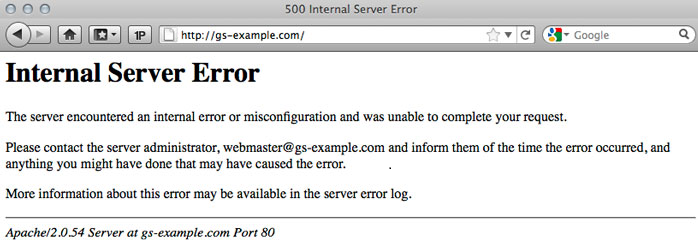
Internal Server Error - Linux When you try to access a website and you ended up with the internal server error then that should be due to the number of possibilities like apache server misconfigured or wrongly written access file and more. This type of error is mostly observed at apache servers. And it will be resolved with the proper configuration changes. The cause of this can be analyzed with the error log. As a website owner it is not a good thing to see your website showing internal server error. Internal server error is a common error thrown by Apache web server in Linux web hosting Nepal server. Like in any http error scenario the error code 500 means it is an internal server error. Generally internal server errors are caused due to something went wrong while processing your web page in the Linux server, could be due to various reasons for example if web server is not able to serve your request due to low disc space or low memory or web server is not able to create a new process to serve your request or it may be due to any coding issue or error issues in database connection. There are hundreds of possibility, why internal server error happening. The best way to analyze your internal server error is, by looking at the error log of Apache. Often you find error log in your public_html folder. If you have disabled error display option in php.ini settings using Cpanel control panel then you will not see any error message in error log. So, first of all, to see what is a problem and why the internal server error is coming, you have to enable error display option in php.in using cPanel. Once you enable error display and warning display option in PHP and then try to access your website once again it might give the same 500 error, this time you check the error log for any possible coding issue. If there is any issue in your source code you can see the error in error_log, otherwise send the email to support team.
A server error means there is either a problem with the operating system, the website or the Internet connection. There are many different kinds of internal server errors, but a "500 error" is the most common. It is up to the operators of the Web server site to locate and analyse the logs which should give further information about the error.
Internal Server Error messages indicate that something, in general, is wrong.
A Permissions Error
A PHP Timeout
A Coding Error in .htaccess
Check the log to find the exact reason for Internal Server Error and resolve accordingly.1) Take a look at your server log to take note of the content of this log file.
2) Do the action that triggers the 500 error
3) Now check the server log again for the additional content that went in there for this error. That will tell you what is going on and why the server gave this error.
It’s important to note that the server side of an application generates this error even though you may see the error code inside your browser. That means that your HTML, client-side JavaScript, or anything else that runs in a browser is not the source of a 500 Internal Server Error. Of course, the name does imply that it’s a server error, but systems have grown so complex today, that this reminder could be helpful.
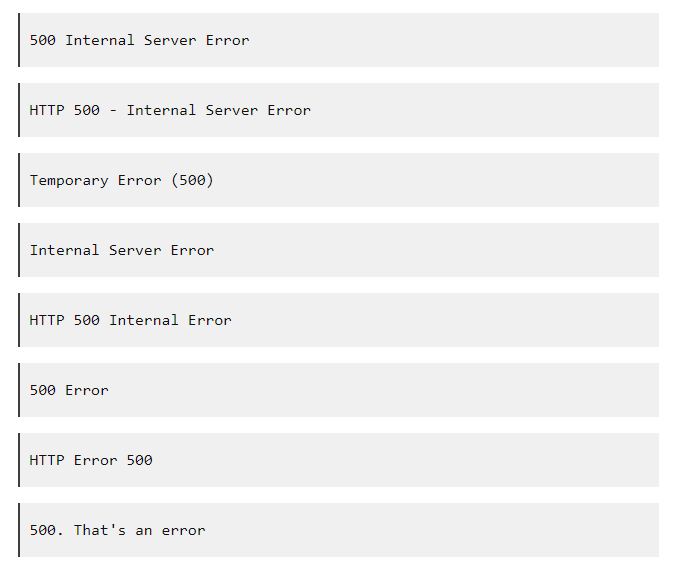
What is Internal Server Error
 And if you are facing internal server issue, then you contact to the support team. Get Help From a Linux Hosting Server Administrator.
Why this issue happens
For the Internal server error, Most of the common reason is,
CHECK THE ERROR LOGS!
ERROR WITH AN .HTACCESS FILE
PHP CODING TIMING OUT
SYNTAX OR CODING ERRORS IN YOUR CGI/PERL SCRIPT
PERMISSION ISSUE
ERRORS IN SCRIPT
How can you prevent this from the future?
We can't prevent from this issue, this issue occurs only when a manual mistakes done by client or server admin.
We can bring solutions to resolve the issue.
How to do in detail?
CHECK THE ERROR LOGS!
With any error message, particularly one as broad as the 500 Internal Server Error, you will first want to check any Apache and PHP error logs for your server. These logs can provide valuable context related to any code failures or other potential causes of a site failure.
ERROR WITH AN .HTACCESS FILE
If you are using a .htaccess on your site, it may be interfering with the web page you are trying to load into your browser. Please double check the .htaccess configuration. Any syntax errors will cause a 500 Internal Server Error message to be displayed instead of your website.
To confirm whether a misconfiguration .htaccess is the cause of the 500 Internal Server error, either remove or rename the .htaccess file temporarily and then try to reload the page
PHP CODING TIMING OUT
If your PHP script makes external network connections, the connections may time out. If too many connections are attempted and time out, this will cause a "500 Internal Server Error." To prevent these time outs and errors, you'll want to make sure that PHP scripts be coded with some timeout rules. Typically, however, catching a timeout error when connecting to a database or externally to remote resources (example: RSS feeds) are difficult. They, in effect, freeze the script from continuing to run.
Removing any external connections can increase both the performance of your website and decrease the chances of you receiving a "500 Internal Server Error."
And if you are facing internal server issue, then you contact to the support team. Get Help From a Linux Hosting Server Administrator.
Why this issue happens
For the Internal server error, Most of the common reason is,
CHECK THE ERROR LOGS!
ERROR WITH AN .HTACCESS FILE
PHP CODING TIMING OUT
SYNTAX OR CODING ERRORS IN YOUR CGI/PERL SCRIPT
PERMISSION ISSUE
ERRORS IN SCRIPT
How can you prevent this from the future?
We can't prevent from this issue, this issue occurs only when a manual mistakes done by client or server admin.
We can bring solutions to resolve the issue.
How to do in detail?
CHECK THE ERROR LOGS!
With any error message, particularly one as broad as the 500 Internal Server Error, you will first want to check any Apache and PHP error logs for your server. These logs can provide valuable context related to any code failures or other potential causes of a site failure.
ERROR WITH AN .HTACCESS FILE
If you are using a .htaccess on your site, it may be interfering with the web page you are trying to load into your browser. Please double check the .htaccess configuration. Any syntax errors will cause a 500 Internal Server Error message to be displayed instead of your website.
To confirm whether a misconfiguration .htaccess is the cause of the 500 Internal Server error, either remove or rename the .htaccess file temporarily and then try to reload the page
PHP CODING TIMING OUT
If your PHP script makes external network connections, the connections may time out. If too many connections are attempted and time out, this will cause a "500 Internal Server Error." To prevent these time outs and errors, you'll want to make sure that PHP scripts be coded with some timeout rules. Typically, however, catching a timeout error when connecting to a database or externally to remote resources (example: RSS feeds) are difficult. They, in effect, freeze the script from continuing to run.
Removing any external connections can increase both the performance of your website and decrease the chances of you receiving a "500 Internal Server Error."
[ad_2]
Internal Server Error - Linux When you try to access a website and you ended up with the internal server error then that should be due to the number of possibilities like apache server misconfigured or wrongly written access file and more. This type of error is mostly observed at apache servers. And it will be resolved with the proper configuration changes. The cause of this can be analyzed with the error log. As a website owner it is not a good thing to see your website showing internal server error. Internal server error is a common error thrown by Apache web server in Linux web hosting Nepal server. Like in any http error scenario the error code 500 means it is an internal server error. Generally internal server errors are caused due to something went wrong while processing your web page in the Linux server, could be due to various reasons for example if web server is not able to serve your request due to low disc space or low memory or web server is not able to create a new process to serve your request or it may be due to any coding issue or error issues in database connection. There are hundreds of possibility, why internal server error happening. The best way to analyze your internal server error is, by looking at the error log of Apache. Often you find error log in your public_html folder. If you have disabled error display option in php.ini settings using Cpanel control panel then you will not see any error message in error log. So, first of all, to see what is a problem and why the internal server error is coming, you have to enable error display option in php.in using cPanel. Once you enable error display and warning display option in PHP and then try to access your website once again it might give the same 500 error, this time you check the error log for any possible coding issue. If there is any issue in your source code you can see the error in error_log, otherwise send the email to support team.
A server error means there is either a problem with the operating system, the website or the Internet connection. There are many different kinds of internal server errors, but a "500 error" is the most common. It is up to the operators of the Web server site to locate and analyse the logs which should give further information about the error.
Internal Server Error messages indicate that something, in general, is wrong.
A Permissions Error
A PHP Timeout
A Coding Error in .htaccess
Check the log to find the exact reason for Internal Server Error and resolve accordingly.1) Take a look at your server log to take note of the content of this log file.
2) Do the action that triggers the 500 error
3) Now check the server log again for the additional content that went in there for this error. That will tell you what is going on and why the server gave this error.
It’s important to note that the server side of an application generates this error even though you may see the error code inside your browser. That means that your HTML, client-side JavaScript, or anything else that runs in a browser is not the source of a 500 Internal Server Error. Of course, the name does imply that it’s a server error, but systems have grown so complex today, that this reminder could be helpful.
What is Internal Server Error
And if you are facing internal server issue, then you contact to the support team. Get Help From a Linux Hosting Server Administrator.
Why this issue happens
For the Internal server error, Most of the common reason is,
CHECK THE ERROR LOGS!
ERROR WITH AN .HTACCESS FILE
PHP CODING TIMING OUT
SYNTAX OR CODING ERRORS IN YOUR CGI/PERL SCRIPT
PERMISSION ISSUE
ERRORS IN SCRIPT
How can you prevent this from the future?
We can't prevent from this issue, this issue occurs only when a manual mistakes done by client or server admin.
We can bring solutions to resolve the issue.
How to do in detail?
CHECK THE ERROR LOGS!
With any error message, particularly one as broad as the 500 Internal Server Error, you will first want to check any Apache and PHP error logs for your server. These logs can provide valuable context related to any code failures or other potential causes of a site failure.
ERROR WITH AN .HTACCESS FILE
If you are using a .htaccess on your site, it may be interfering with the web page you are trying to load into your browser. Please double check the .htaccess configuration. Any syntax errors will cause a 500 Internal Server Error message to be displayed instead of your website.
To confirm whether a misconfiguration .htaccess is the cause of the 500 Internal Server error, either remove or rename the .htaccess file temporarily and then try to reload the page
PHP CODING TIMING OUT
If your PHP script makes external network connections, the connections may time out. If too many connections are attempted and time out, this will cause a "500 Internal Server Error." To prevent these time outs and errors, you'll want to make sure that PHP scripts be coded with some timeout rules. Typically, however, catching a timeout error when connecting to a database or externally to remote resources (example: RSS feeds) are difficult. They, in effect, freeze the script from continuing to run.
Removing any external connections can increase both the performance of your website and decrease the chances of you receiving a "500 Internal Server Error."
[ad_2]
Advertisement