
How to Use Track Delivery In Cpanel?
Track Email Delivery from cPanel is the email Trace option in cPanel is used to notice delivery reports of email solutions. It will show the errors while sending your email. You will also see spam scores of your emails.
[ad_1]
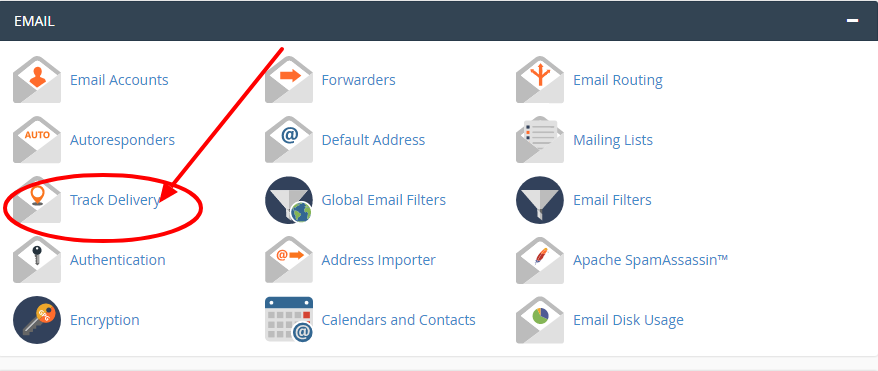
What do you mean by Track Delivery in cpanel? Track Email Delivery from cPanel is the email Trace option in cPanel is used to notice delivery reports of email solutions. It will show the errors while sending your email. You will also see spam scores of your emails. You can also check the emails delivery route to assist you to identify any issues within the delivery attempt. What is cPanel? A cPanel hosting is a hosting account that offers a panel interface to run the cPanel software. The popularity of this software within the web hosting community and with the webmasters is large because of its user-friendly powerful interface with numerous of powerful tools to execute essentials functions faster, easier, and reliably. Webmasters prefer cpanel because it offers an intuitive interface to help them run their website. Steps to use track delivery In Cpanel: Step-1: Login to cpanel Step-2: Select Track Delivery from Email section
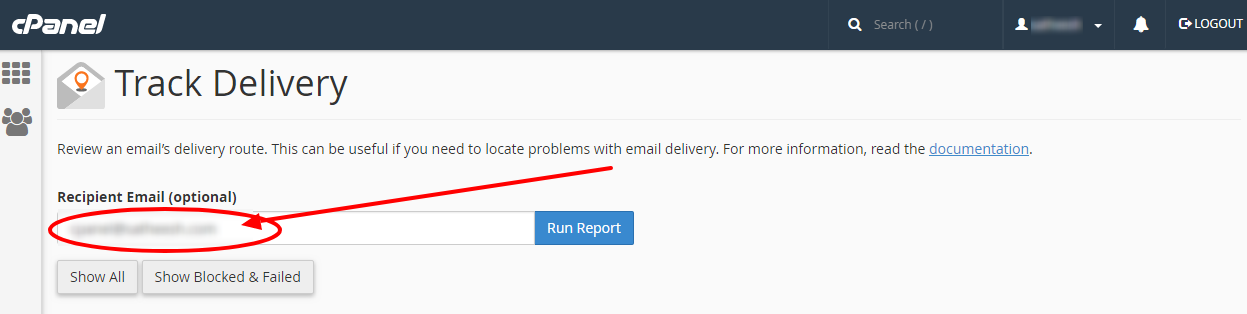
Step-3: Enter the recipient email address in the Search text box
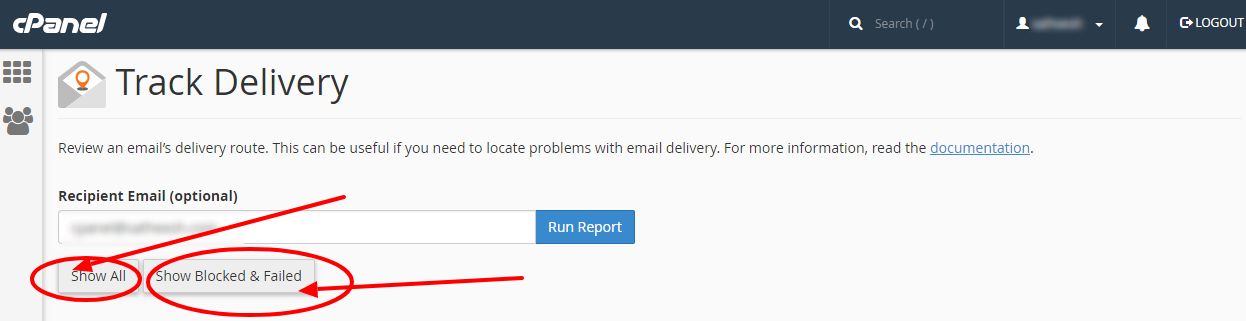
 Step-4: Click on Show All to refresh the results in the Delivery Report table and the Email Server Trace diagram.
==>To display only the delivery of failures, click Show Blocked & Failed.
Step-4: Click on Show All to refresh the results in the Delivery Report table and the Email Server Trace diagram.
==>To display only the delivery of failures, click Show Blocked & Failed.
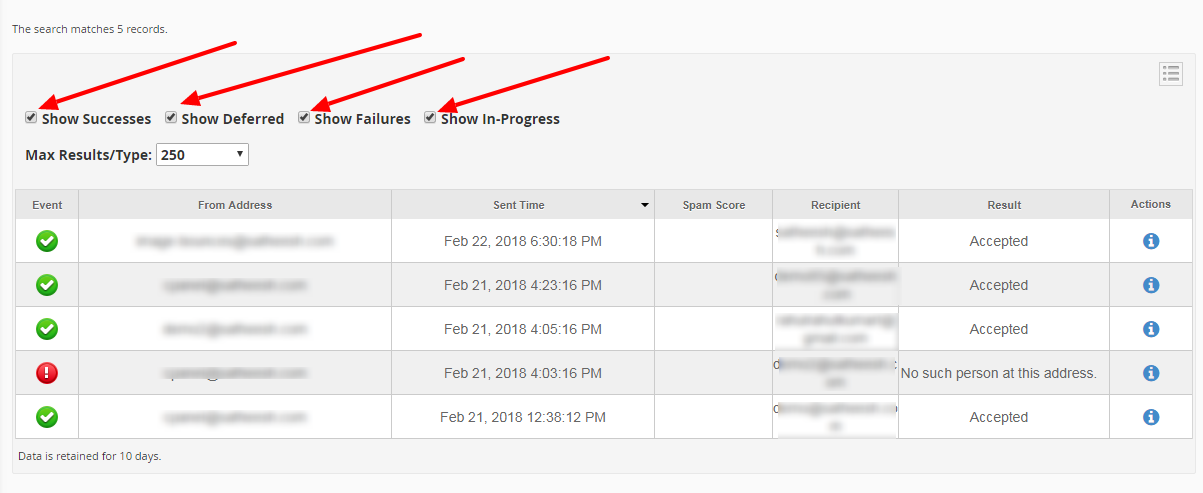
 Step-5: To filter the records by a result, choose any of the following checkboxes:
==>Show Successes
==>Show Deferred
==>Show Failures
==>Show In-Progress
Step-5: To filter the records by a result, choose any of the following checkboxes:
==>Show Successes
==>Show Deferred
==>Show Failures
==>Show In-Progress
[ad_2]
What do you mean by Track Delivery in cpanel? Track Email Delivery from cPanel is the email Trace option in cPanel is used to notice delivery reports of email solutions. It will show the errors while sending your email. You will also see spam scores of your emails. You can also check the emails delivery route to assist you to identify any issues within the delivery attempt. What is cPanel? A cPanel hosting is a hosting account that offers a panel interface to run the cPanel software. The popularity of this software within the web hosting community and with the webmasters is large because of its user-friendly powerful interface with numerous of powerful tools to execute essentials functions faster, easier, and reliably. Webmasters prefer cpanel because it offers an intuitive interface to help them run their website. Steps to use track delivery In Cpanel: Step-1: Login to cpanel Step-2: Select Track Delivery from Email section
Step-3: Enter the recipient email address in the Search text box
Step-4: Click on Show All to refresh the results in the Delivery Report table and the Email Server Trace diagram.
==>To display only the delivery of failures, click Show Blocked & Failed.
Step-5: To filter the records by a result, choose any of the following checkboxes:
==>Show Successes
==>Show Deferred
==>Show Failures
==>Show In-Progress
[ad_2]
Advertisement