
How to take backup of emails and restore in shared Linux webmail
[ad_1]
If you are using a website for your personal use or for your business purpose then you may need each data. And today if you are using Shared Linux hosting for your website and if you are looking for more information on How to take the backup of your email and also how to restore it in the Shared Linux webmail means here is the complete information with easy steps. If you are using a cpanel mail service you can able to backup and restore the emails via an email interface RoundCube and Horde webmails.
You can access the webmail from the below link.
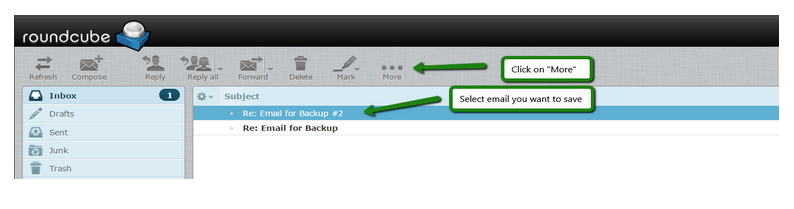
yourdomainname/webmail In order to take the backup of your emails to your local system, Choose the emails which you want to take the backup and click on more option in the above menu bar
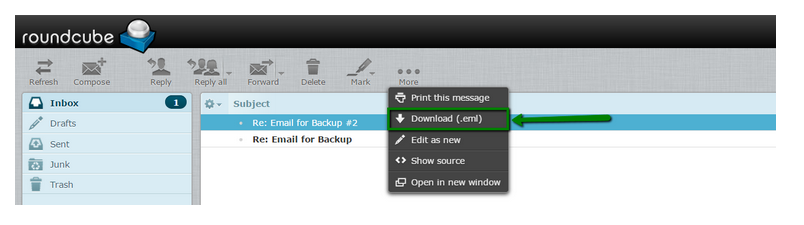
Under the drop down options you will see the option download (.eml) option and click on the same and choose the location to which you need to download the emails
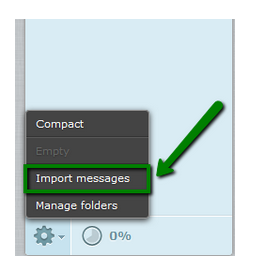
 To restore the emails from Roundcube follow the below steps:1) Click on the Gear icon---> and select the import messages
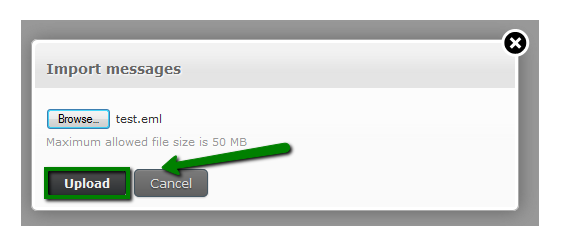
 2) choose the backup file from your local machine and click on the upload button
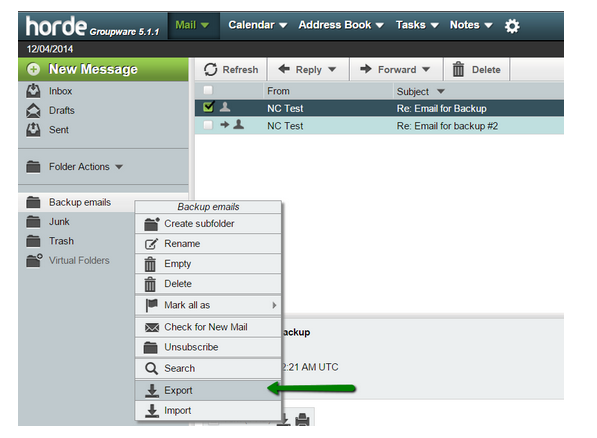
Backup and restoring the emails in the horde is similar to the roundcube as mentioned in the below steps:1) Checkmark the emails which you want to download and select the save option under the drop-down menu and the email will save in the .eml format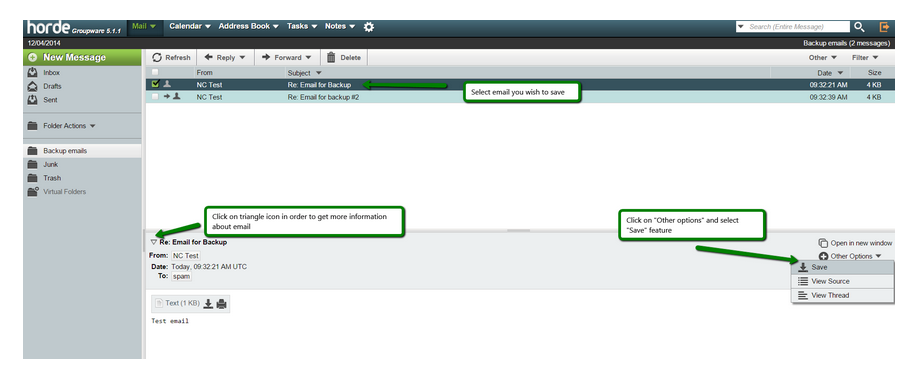 2) To save all the emails which is present in the folder (inbox, sent etc..) right click and select the option export and you need to choose the format in which you need a backup and click on ok.
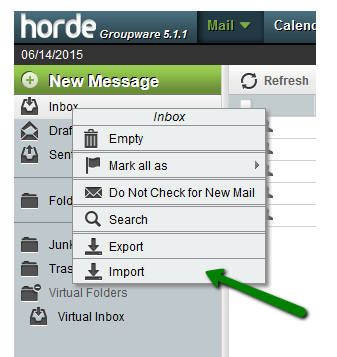
To import or restore the emails right click on the folder to which you need to import and choose the option import
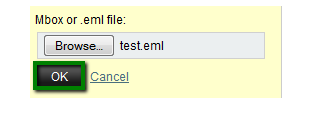
2) Select the file from your local machine and click on ok
Get the best email hosting solution for your business from HostingSewa Nepal #1 web hosting provider with years of experience in providing expertized email solution for our customers at an affordable price. At HostingSewa we have 4 different types of email hosting packages so you can choose the right one as per your requirements. With our Email solution, you also get amazing features, offers and discounts. Not only that we also provide 99.9% server uptime with 24/7 customer support via phone, email, chat and ticket system.
[ad_2]
If you are using a website for your personal use or for your business purpose then you may need each data. And today if you are using Shared Linux hosting for your website and if you are looking for more information on How to take the backup of your email and also how to restore it in the Shared Linux webmail means here is the complete information with easy steps. If you are using a cpanel mail service you can able to backup and restore the emails via an email interface RoundCube and Horde webmails.
You can access the webmail from the below link.
yourdomainname/webmail In order to take the backup of your emails to your local system, Choose the emails which you want to take the backup and click on more option in the above menu bar
Under the drop down options you will see the option download (.eml) option and click on the same and choose the location to which you need to download the emails
To restore the emails from Roundcube follow the below steps:1) Click on the Gear icon---> and select the import messages
2) choose the backup file from your local machine and click on the upload button
Backup and restoring the emails in the horde is similar to the roundcube as mentioned in the below steps:1) Checkmark the emails which you want to download and select the save option under the drop-down menu and the email will save in the .eml format
2) To save all the emails which is present in the folder (inbox, sent etc..) right click and select the option export and you need to choose the format in which you need a backup and click on ok.
To import or restore the emails right click on the folder to which you need to import and choose the option import
2) Select the file from your local machine and click on ok
Get the best email hosting solution for your business from HostingSewa Nepal #1 web hosting provider with years of experience in providing expertized email solution for our customers at an affordable price. At HostingSewa we have 4 different types of email hosting packages so you can choose the right one as per your requirements. With our Email solution, you also get amazing features, offers and discounts. Not only that we also provide 99.9% server uptime with 24/7 customer support via phone, email, chat and ticket system.
[ad_2]
Advertisement