
How to remove .php, .html, extensions using .htaccess.
[ad_1]
What is a .htaccess file?
In the page, we will discuss how the remove .php, .html extensions using a .htaccess file. Before that let us know more about the .htaccess file.
A .htaccess is basically a configuration file for use on web servers. These .htaccess files can be used to alter the configuration of the Web Server software to enable/disable additional functionality and features. These features include basic redirect functionality, content password protection, image hotlink prevention, and PHP error logging.
A .htaccess file is a simple ASCII file that which is created with a simple text editor like any notepad.
You make configuration changes in the server using a .htaccess file.
The .htaccess is just a file’s extension. It's not a file .htaccess, it is a simple .htaccess file. The .htaccess files can be uploaded to all sub-directories and main directories. For example, if you uploaded any .htaccess file located in your root directory of Domain.com, it would affect Domain.com/content/, Domain.com/content/images/, etc.
How the .htaccess file helps you?
Using .htaccess file can perform various operations such as
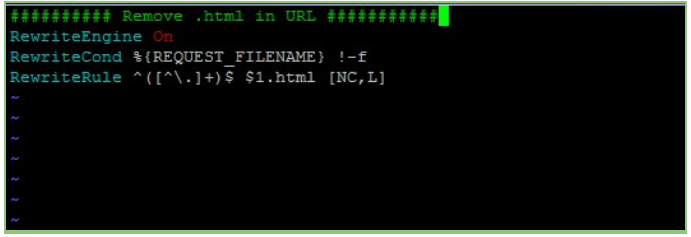
To remove the .html extension from a file, for example, Domain.com/admin.html to Domain.com/admin you have to add the mentioned below code in the .htaccess file.
 By including the above appropriate code you can remove the extension. You can also remove the PHP extension of the particular folder that is if you want to remove the Index.php successfully from your website URL then you need to make sure that the mod_rewrite module is enabled on your server. So to know whether the mod_rewrite module is enabled or not you can contact our support team and they will help in this case.
But you can also try a technique called URL rewriting where it allows you to hide the index.php portion of the URL behind the scenes. To remove the “index.php” from your site’s URLs, you need to make sure your server is set up to pass 404 requests off to index.php file behind the scenes.
In Apache, you need redirection code in your site’s .htaccess file. If there is no .htaccess file existing (also check if the .htaccess file is present in the hidden files)then you need to create a new file called “.htaccess” in the site’s web root directory.
Adding the below code in the .htaccess file you can remove the extension for a specific folder. Here the code index.php file is taken as an example. For removing the extension for any other folder you need to replace the index.php with the desired file name.
By including the above appropriate code you can remove the extension. You can also remove the PHP extension of the particular folder that is if you want to remove the Index.php successfully from your website URL then you need to make sure that the mod_rewrite module is enabled on your server. So to know whether the mod_rewrite module is enabled or not you can contact our support team and they will help in this case.
But you can also try a technique called URL rewriting where it allows you to hide the index.php portion of the URL behind the scenes. To remove the “index.php” from your site’s URLs, you need to make sure your server is set up to pass 404 requests off to index.php file behind the scenes.
In Apache, you need redirection code in your site’s .htaccess file. If there is no .htaccess file existing (also check if the .htaccess file is present in the hidden files)then you need to create a new file called “.htaccess” in the site’s web root directory.
Adding the below code in the .htaccess file you can remove the extension for a specific folder. Here the code index.php file is taken as an example. For removing the extension for any other folder you need to replace the index.php with the desired file name.
- Using the .htaccess you can make sure that the URLs are more user and search engine friendly.
- You can remove the extensions like .php, .html, .htm, with the help of .htaccess
- You can redirect the user to a different page or domain.
- You also redirect the domain from HTTP to HTTPS
- Blocking the Ip by countries or series of IPs
- password protection for the specific Directories.
- Rewrite URL's, error logging, hotlink prevention techniques
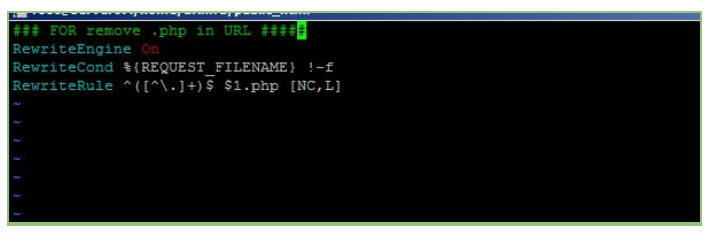
RewriteEngine On
RewriteCond %{REQUEST_FILENAME} !-f
RewriteRule ^([^.]+)$ $1.php [NC,L]
To remove the .html extension from a file, for example, Domain.com/admin.html to Domain.com/admin you have to add the mentioned below code in the .htaccess file.
RewriteEngine On
RewriteCond %{REQUEST_FILENAME} !-f
RewriteRule ^([^.]+)$ $1.html [NC,L]
By including the above appropriate code you can remove the extension. You can also remove the PHP extension of the particular folder that is if you want to remove the Index.php successfully from your website URL then you need to make sure that the mod_rewrite module is enabled on your server. So to know whether the mod_rewrite module is enabled or not you can contact our support team and they will help in this case.
But you can also try a technique called URL rewriting where it allows you to hide the index.php portion of the URL behind the scenes. To remove the “index.php” from your site’s URLs, you need to make sure your server is set up to pass 404 requests off to index.php file behind the scenes.
In Apache, you need redirection code in your site’s .htaccess file. If there is no .htaccess file existing (also check if the .htaccess file is present in the hidden files)then you need to create a new file called “.htaccess” in the site’s web root directory.
Adding the below code in the .htaccess file you can remove the extension for a specific folder. Here the code index.php file is taken as an example. For removing the extension for any other folder you need to replace the index.php with the desired file name.
  RewriteEngine On
  RewriteCond %{REQUEST_FILENAME} !-f
  RewriteCond %{REQUEST_FILENAME} !-d
  RewriteRule ^(.*)$ /index.php?/$1 [L]
</IfModule
But sometimes there will be some problems like links returning 404s, No Input File Specified error or all links may returning to the same content. So, in that case, you can force query strings. And still, if you are facing the same issue then you can rename .htaccess to something else and set the name of your website's index page in the cPanel back to index.php.
If your website is using CodeIgniter framework and you need to remove the index.php from the URL then you can do it by removing it from the config file and with a proper .htaccess file with rewrite rule to remove .htaccess file, If index.php is removed without proper a proper .htaccess file or configuration steps then the site will show 404 Error page.
If you need any assistance, feel free to contact our technical team members as they are available 24/7 via phone call, email, ticket system or call out no 9863075120.
[ad_2]Advertisement