
How to Configure UCP Email ID in Gmail

[ad_1]
Today email plays as an important medium of communication in all the field, moreover today everyone uses email facility for their business. And today if you are using an email service for your website then you can easily get connected with the people around you not only that with the help of email you can also do marketing of your products. And in this way, it helps your business to grow. And today if you are using a website and if you want to configure your website email with Gmail account then here is the solution for it.In this page, we will discuss how to configure UCP Email ID in Gmail. When hosting your domain in a UCP, In UCP, you can set up email accounts, email forwarders, spam filtering, and other features. You can an email address for the domain (something like This email address is being protected from spambots. You need JavaScript enabled to view it.) and you access your mail through webmail. The most commonly used webmail software are SquirrelMail,Horde, and RoundCube and these tools are good for sending and receiving emails but they are not as comfortable as Gmail. Gmail has a good interface, folder structure, Spam filtering, easy to access email from anywhere from any mobile device.Hence setting up your UCP mail account in Gmail is worth it.You can easily combine hosted UCP email address with current Gmail address. Thus you can send/receive emails through Gmail without bothering about hosting company email tools.
Steps to create an email account in your UCP:
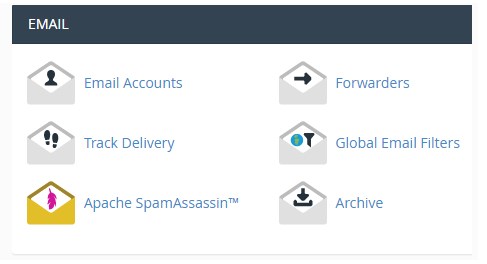
Step 1: Login to your UCP using https://yourdomain.com/UCP replace yourdomain.com with your domain name. (use your UCP username and password to log in)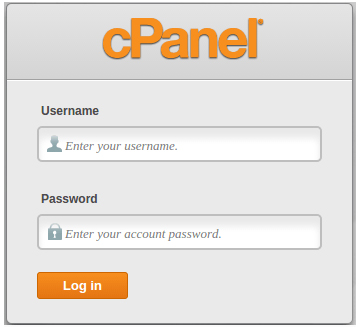 Step 2: In email accounts, click on add Email Account and enter the required details for creating a new email account for your business:
Email: enter your email account name
Domain: Enter the domain for which you want Email id (if you have more than one domain in your UCP)
Password and Password (again): Enter the password for the email account, you can also generate the password using the password generator but be sure to copy the password.
Mailbox Quota: Enter the Quota of your mailbox, you either give your Quota or select Unlimited
Step 2: In email accounts, click on add Email Account and enter the required details for creating a new email account for your business:
Email: enter your email account name
Domain: Enter the domain for which you want Email id (if you have more than one domain in your UCP)
Password and Password (again): Enter the password for the email account, you can also generate the password using the password generator but be sure to copy the password.
Mailbox Quota: Enter the Quota of your mailbox, you either give your Quota or select Unlimited
 Make sure to use strong passwords for an email address. Having weak passwords allows hackers to steal information from their accounts. So use a strong password.
Step 3: After you enter the required details >> click on create the account, your email address will be created successfully.
Steps to Configure UCP Email ID in Gmail
Step 1: Login to your Gmail account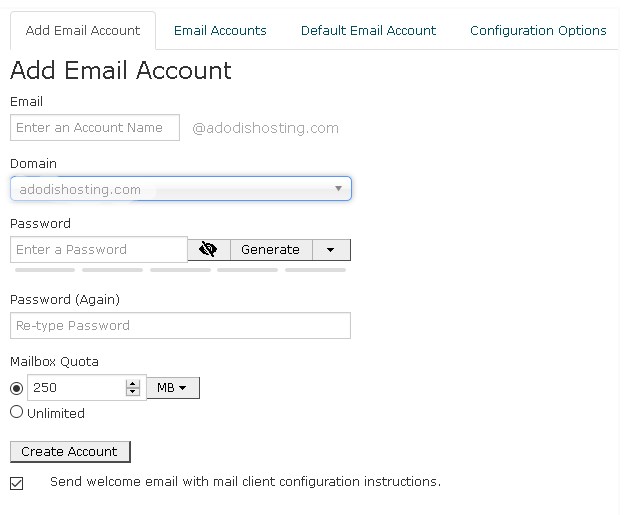 Make sure to use strong passwords for an email address. Having weak passwords allows hackers to steal information from your accounts. So use tough password.Then click on the create button to finish.That’s all you have successfully created a business email address.Step 1: Login to your Gmail account
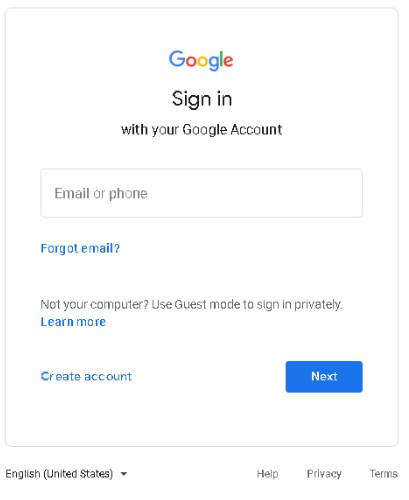 Step 2: Click the gear icon on to the right side, and click the setting.
Step 3: Click the tab “Accounts”, in Send mail as section >> click on Add another email address
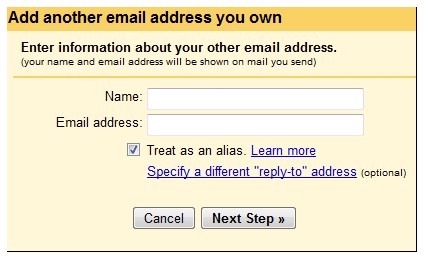
Step 4: In the section, enter your name and email address and click on the next step.
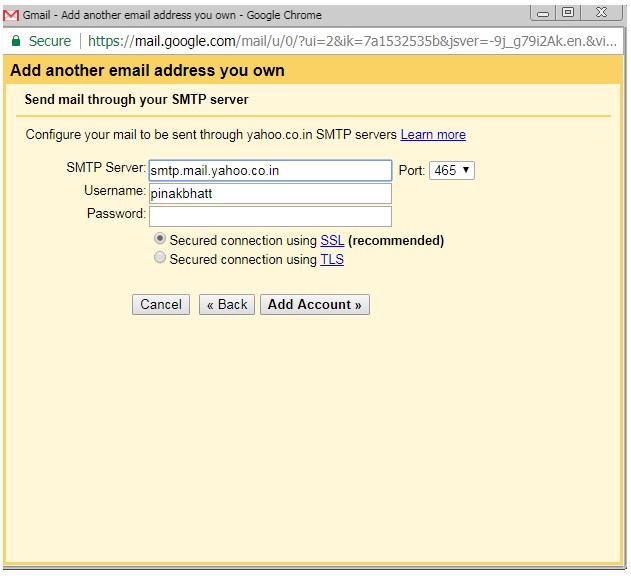
Step 5: Click the next section, Enter you need to configure your mail to be sent through SMTP, for configuring this enter the following details:
SMTP server: Enter the SMTP server provide, mail.yourdomain.com (eg mail.abcxyz.com)
Port: Select the port number: 25
Username: Enter the email id of your domain name (e.g. This email address is being protected from spambots. You need JavaScript enabled to view it.)
Password: Enter your password of mail id
Select which secured connection you need either by TLS or SSL, Select the appropriate checkbox
Step 2: Click the gear icon on to the right side, and click the setting.
Step 3: Click the tab “Accounts”, in Send mail as section >> click on Add another email address
Step 4: In the section, enter your name and email address and click on the next step.
Step 5: Click the next section, Enter you need to configure your mail to be sent through SMTP, for configuring this enter the following details:
SMTP server: Enter the SMTP server provide, mail.yourdomain.com (eg mail.abcxyz.com)
Port: Select the port number: 25
Username: Enter the email id of your domain name (e.g. This email address is being protected from spambots. You need JavaScript enabled to view it.)
Password: Enter your password of mail id
Select which secured connection you need either by TLS or SSL, Select the appropriate checkbox
After you enter the details >> Click on Add account.
 Step 6: You need to verify the your mail ID >> Open your mail account >> you can either click the link in the message Gmail sent or enter the confirmation code in the Accounts section of your Gmail settings.
Note:
If Gmail sent a verification email and you didn’t receive it, try checking your Spam folder for a message.
If you are looking for the best email hosting solution for your website then here at HostingSewa we provide best in class email hosting solution with the latest features at an affordable price. Not only that we also provide 24/7 customer support via phone, ticket system, and email. Get your email hosting solution today from HostingSewa Nepal's #1 hosting provider!!
Step 6: You need to verify the your mail ID >> Open your mail account >> you can either click the link in the message Gmail sent or enter the confirmation code in the Accounts section of your Gmail settings.
Note:
If Gmail sent a verification email and you didn’t receive it, try checking your Spam folder for a message.
If you are looking for the best email hosting solution for your website then here at HostingSewa we provide best in class email hosting solution with the latest features at an affordable price. Not only that we also provide 24/7 customer support via phone, ticket system, and email. Get your email hosting solution today from HostingSewa Nepal's #1 hosting provider!!
[ad_2]
Today email plays as an important medium of communication in all the field, moreover today everyone uses email facility for their business. And today if you are using an email service for your website then you can easily get connected with the people around you not only that with the help of email you can also do marketing of your products. And in this way, it helps your business to grow. And today if you are using a website and if you want to configure your website email with Gmail account then here is the solution for it.In this page, we will discuss how to configure UCP Email ID in Gmail. When hosting your domain in a UCP, In UCP, you can set up email accounts, email forwarders, spam filtering, and other features. You can an email address for the domain (something like This email address is being protected from spambots. You need JavaScript enabled to view it.) and you access your mail through webmail. The most commonly used webmail software are SquirrelMail,Horde, and RoundCube and these tools are good for sending and receiving emails but they are not as comfortable as Gmail. Gmail has a good interface, folder structure, Spam filtering, easy to access email from anywhere from any mobile device.Hence setting up your UCP mail account in Gmail is worth it.You can easily combine hosted UCP email address with current Gmail address. Thus you can send/receive emails through Gmail without bothering about hosting company email tools.
Steps to create an email account in your UCP:
Step 1: Login to your UCP using https://yourdomain.com/UCP replace yourdomain.com with your domain name. (use your UCP username and password to log in)
 Step 2: In email accounts, click on add Email Account and enter the required details for creating a new email account for your business:
Email: enter your email account name
Domain: Enter the domain for which you want Email id (if you have more than one domain in your UCP)
Password and Password (again): Enter the password for the email account, you can also generate the password using the password generator but be sure to copy the password.
Mailbox Quota: Enter the Quota of your mailbox, you either give your Quota or select Unlimited
Make sure to use strong passwords for an email address. Having weak passwords allows hackers to steal information from their accounts. So use a strong password.
Step 2: In email accounts, click on add Email Account and enter the required details for creating a new email account for your business:
Email: enter your email account name
Domain: Enter the domain for which you want Email id (if you have more than one domain in your UCP)
Password and Password (again): Enter the password for the email account, you can also generate the password using the password generator but be sure to copy the password.
Mailbox Quota: Enter the Quota of your mailbox, you either give your Quota or select Unlimited
Make sure to use strong passwords for an email address. Having weak passwords allows hackers to steal information from their accounts. So use a strong password.
Step 3: After you enter the required details >> click on create the account, your email address will be created successfully.
Steps to Configure UCP Email ID in Gmail
Step 1: Login to your Gmail account
Make sure to use strong passwords for an email address. Having weak passwords allows hackers to steal information from your accounts. So use tough password.Then click on the create button to finish.That’s all you have successfully created a business email address.Step 1: Login to your Gmail account
Step 2: Click the gear icon on to the right side, and click the setting.
Step 3: Click the tab “Accounts”, in Send mail as section >> click on Add another email address
Step 4: In the section, enter your name and email address and click on the next step.
Step 5: Click the next section, Enter you need to configure your mail to be sent through SMTP, for configuring this enter the following details:
SMTP server: Enter the SMTP server provide, mail.yourdomain.com (eg mail.abcxyz.com)
Port: Select the port number: 25
Username: Enter the email id of your domain name (e.g. This email address is being protected from spambots. You need JavaScript enabled to view it.)
Password: Enter your password of mail id
Select which secured connection you need either by TLS or SSL, Select the appropriate checkbox
After you enter the details >> Click on Add account.
Step 6: You need to verify the your mail ID >> Open your mail account >> you can either click the link in the message Gmail sent or enter the confirmation code in the Accounts section of your Gmail settings.
Note:
If Gmail sent a verification email and you didn’t receive it, try checking your Spam folder for a message.
If you are looking for the best email hosting solution for your website then here at HostingSewa we provide best in class email hosting solution with the latest features at an affordable price. Not only that we also provide 24/7 customer support via phone, ticket system, and email. Get your email hosting solution today from HostingSewa Nepal's #1 hosting provider!!
[ad_2]
Advertisement