
How to change database settings in HS Panel?
[ad_1]
How to change database settings in HS Panel? If you are having a website for your business then it is one of the best way where you can easily showcase your business products and services to the people around you and also to the people across the globe. Because today a lot of people are using the internet services and most on then will be online so it is very easy to get in touch with the people who are looking for the products and services that you are providing. Not only that today if you are having a website for your business then you can easily market your business products and services.
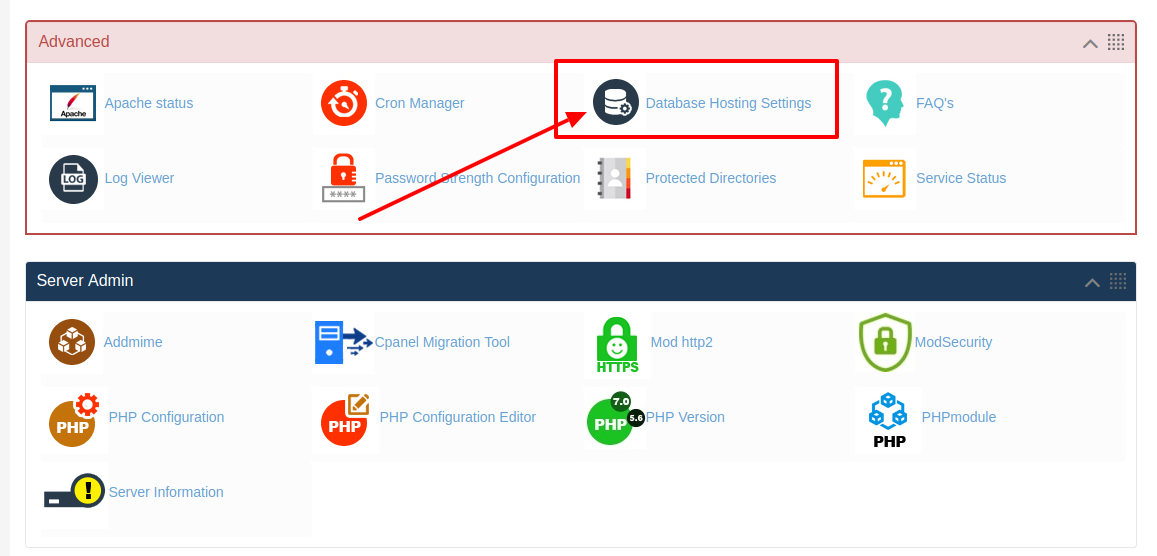
Here is the Video on How to change database hosting settings in HS Panel: But today if you are already using a website for your business from HostingSewa then you will be provided with Panel Sewa or Cpanel where you can easily handle and manage your website. So now if you are looking for information on how to change database hosting settings in HS Panel then here it the complete information on it. Database Hosting Settings is an option where you can change the Database name in your MySQL Database, simply by choosing an option. Follow the below change database hosting settings in HS Panel in a server: >>>> First log in to Panel Sewa or Cpanel >>>> Now go to Advanced and click on Database Hosting Settings
>>>> Now in there you will see an option "Configure your Database Name and Username"
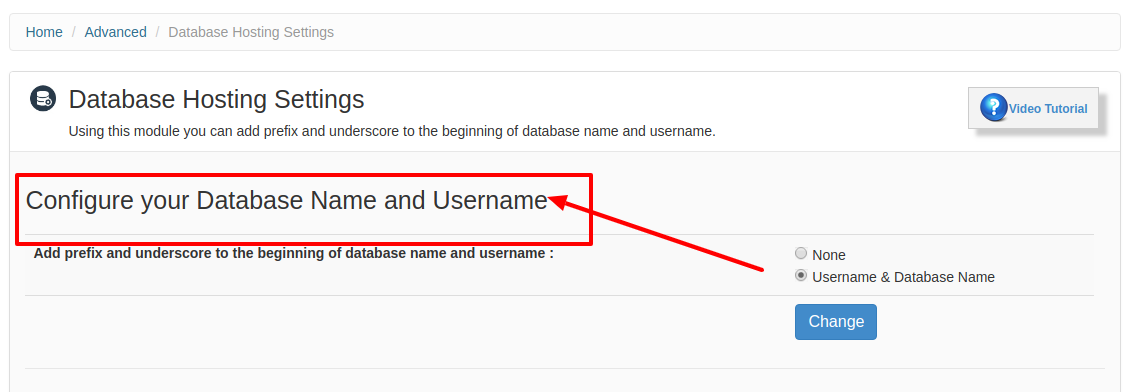 >>>> And now there will be 2 options "None" and " Username & Database Name" you can choose your desired one and click on "Change"
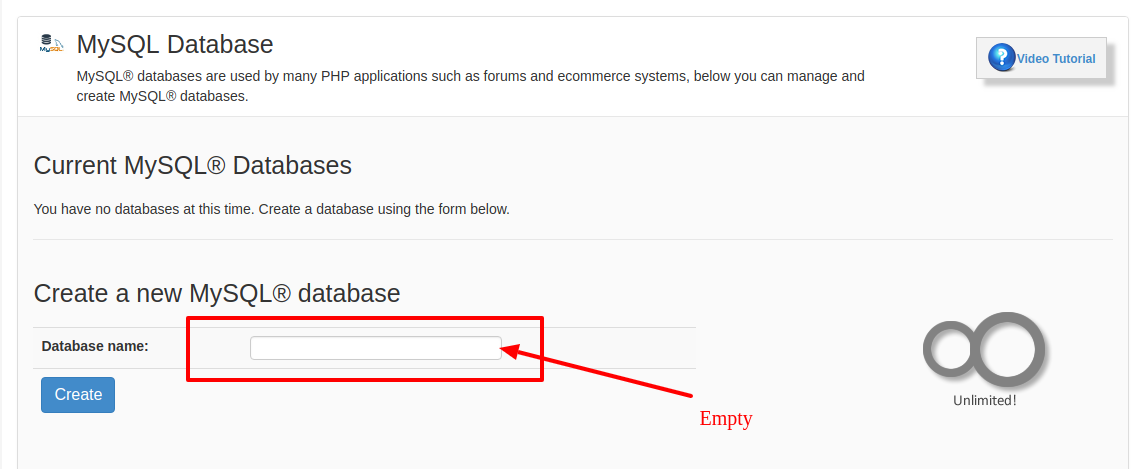
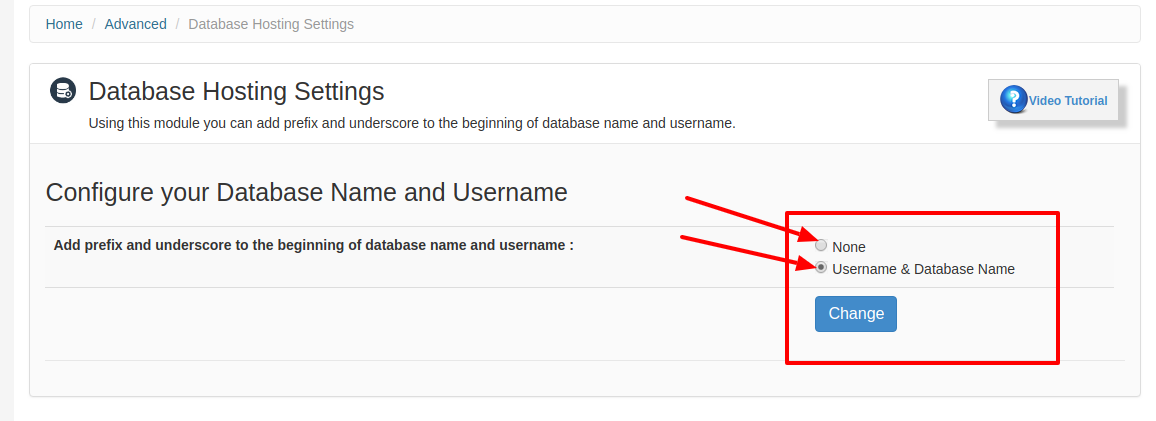 Note: If you click on none then when you Create a new MySQL® database it will not mention the path.
And if you click on Username & Database Name then it will display the path under which you need to create. You can see in the below images
None
Note: If you click on none then when you Create a new MySQL® database it will not mention the path.
And if you click on Username & Database Name then it will display the path under which you need to create. You can see in the below images
None
 Username & Database Name
If you are looking for a best hosting solution for your website then you are at right place. Here at HostingSewa, we have years of experience in providing best in class hosting solution for our customers. And today if you think that there will be huge web traffic for your website then you can choose our server which is available at an affordable price. Not only that we also provide amazing features, offers and discounts. With our server, you get more resources and also with the root access to your server. So with the help of that you can easily manage and handle your website and you can also install, run, edit and delete any applications, software, files and data. We also provide 99.9% server uptime with 24/7 customer support via phone, chat, email and ticket system. We also provide managed dedicated hosting solution where our special support team will take care of your website and hosting related issue. But this way we help you to focus on your core business.
Username & Database Name
If you are looking for a best hosting solution for your website then you are at right place. Here at HostingSewa, we have years of experience in providing best in class hosting solution for our customers. And today if you think that there will be huge web traffic for your website then you can choose our server which is available at an affordable price. Not only that we also provide amazing features, offers and discounts. With our server, you get more resources and also with the root access to your server. So with the help of that you can easily manage and handle your website and you can also install, run, edit and delete any applications, software, files and data. We also provide 99.9% server uptime with 24/7 customer support via phone, chat, email and ticket system. We also provide managed dedicated hosting solution where our special support team will take care of your website and hosting related issue. But this way we help you to focus on your core business.
[ad_2]
How to change database settings in HS Panel? If you are having a website for your business then it is one of the best way where you can easily showcase your business products and services to the people around you and also to the people across the globe. Because today a lot of people are using the internet services and most on then will be online so it is very easy to get in touch with the people who are looking for the products and services that you are providing. Not only that today if you are having a website for your business then you can easily market your business products and services.
Here is the Video on How to change database hosting settings in HS Panel: But today if you are already using a website for your business from HostingSewa then you will be provided with Panel Sewa or Cpanel where you can easily handle and manage your website. So now if you are looking for information on how to change database hosting settings in HS Panel then here it the complete information on it. Database Hosting Settings is an option where you can change the Database name in your MySQL Database, simply by choosing an option. Follow the below change database hosting settings in HS Panel in a server: >>>> First log in to Panel Sewa or Cpanel >>>> Now go to Advanced and click on Database Hosting Settings
>>>> Now in there you will see an option "Configure your Database Name and Username"
>>>> And now there will be 2 options "None" and " Username & Database Name" you can choose your desired one and click on "Change"
Note: If you click on none then when you Create a new MySQL® database it will not mention the path.
And if you click on Username & Database Name then it will display the path under which you need to create. You can see in the below images
None
Username & Database Name
If you are looking for a best hosting solution for your website then you are at right place. Here at HostingSewa, we have years of experience in providing best in class hosting solution for our customers. And today if you think that there will be huge web traffic for your website then you can choose our server which is available at an affordable price. Not only that we also provide amazing features, offers and discounts. With our server, you get more resources and also with the root access to your server. So with the help of that you can easily manage and handle your website and you can also install, run, edit and delete any applications, software, files and data. We also provide 99.9% server uptime with 24/7 customer support via phone, chat, email and ticket system. We also provide managed dedicated hosting solution where our special support team will take care of your website and hosting related issue. But this way we help you to focus on your core business.
 If you are looking for a best hosting solution for your website then you are at right place. Here at HostingSewa, we have years of experience in providing best in class hosting solution for our customers. And today if you think that there will be huge web traffic for your website then you can choose our server which is available at an affordable price. Not only that we also provide amazing features, offers and discounts. With our server, you get more resources and also with the root access to your server. So with the help of that you can easily manage and handle your website and you can also install, run, edit and delete any applications, software, files and data. We also provide 99.9% server uptime with 24/7 customer support via phone, chat, email and ticket system. We also provide managed dedicated hosting solution where our special support team will take care of your website and hosting related issue. But this way we help you to focus on your core business.
[ad_2]
Advertisement