
How to change changing the password
[ad_1]
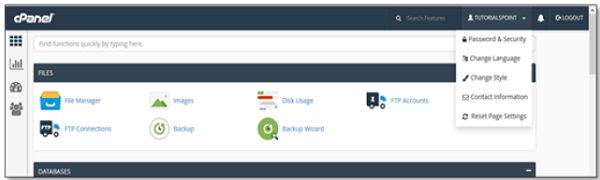
Once you have logged into the cPanel Dashboard, the first and the foremost thing that needs to be done is to change the password of the cPanel account. This is a very important step, this will keep the security of cPanel. Nobody would want their cPanel account to be hacked.
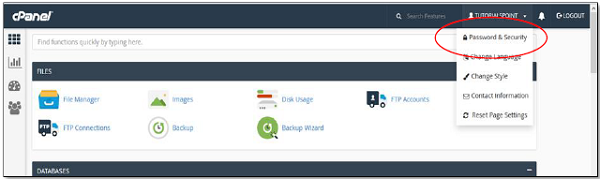
2. Once you click the Password and security option. You will be able to change the password.
 3. Now you need to write the old password in the fields, and then you need to write your new password.
 4. Now you need to enable the digest authentication option and if you need to access your web disk through an unencrypted connection in windows machine. This type of connection is not recommended as it is not secure.
5. Now you need to click on the change password button, by which you will be able to change the password. If you are successful then Linux Hosting cPanel will automatically log out and then you will have to login again with a new password.
4. Now you need to enable the digest authentication option and if you need to access your web disk through an unencrypted connection in windows machine. This type of connection is not recommended as it is not secure.
5. Now you need to click on the change password button, by which you will be able to change the password. If you are successful then Linux Hosting cPanel will automatically log out and then you will have to login again with a new password.
[ad_2]
Once you have logged into the cPanel Dashboard, the first and the foremost thing that needs to be done is to change the password of the cPanel account. This is a very important step, this will keep the security of cPanel. Nobody would want their cPanel account to be hacked.
Steps in changing the password in cPanel
On cPanel Home screen, click on the username which is written on the right corner of the dashboard.
2. Once you click the Password and security option. You will be able to change the password.
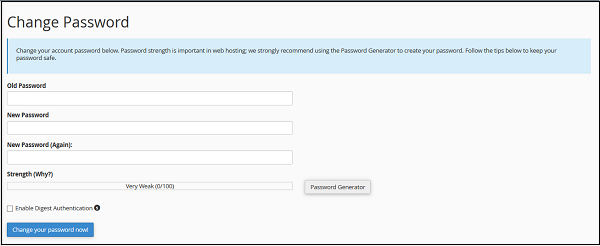
3. Now you need to write the old password in the fields, and then you need to write your new password.
4. Now you need to enable the digest authentication option and if you need to access your web disk through an unencrypted connection in windows machine. This type of connection is not recommended as it is not secure.
5. Now you need to click on the change password button, by which you will be able to change the password. If you are successful then Linux Hosting cPanel will automatically log out and then you will have to login again with a new password.
[ad_2]
Advertisement