
How To Add And Edit Text In HostingSewa Site Builder?
[ad_1]
Once you are done with selecting the theme for your website the next step is to add content to your website. Adding content means giving information to the people about your website and also being precise on what you are going to showcase to the public. Adding text content to your website is easy. Here at HostingSewa, we provide easy to build website builder to our customers with amazing features. All you need to take care of is about Title and Text.
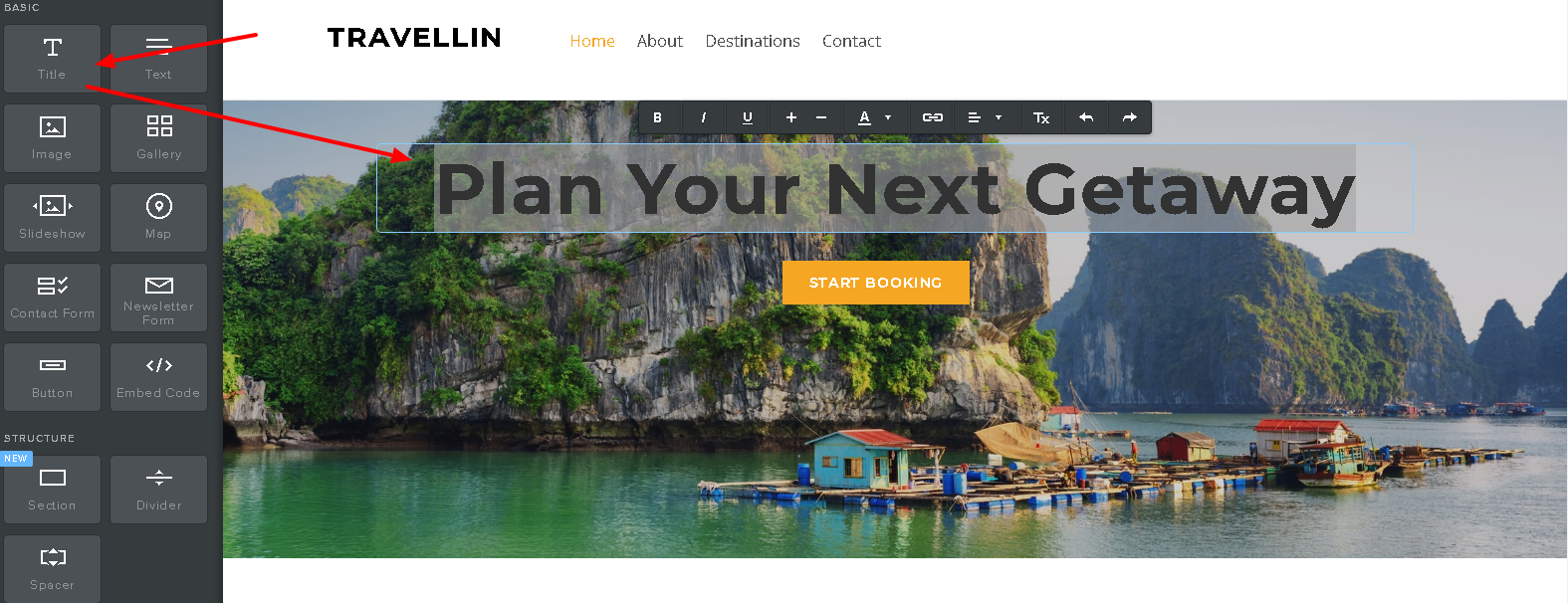
Here on website builder from HostingSewa you can easily add and edit on your website. To add a title to your website you need to click on the title tab which you can see on your left side of your screen. And next, you can add your desired title for your website. And you also have to see that your title text is larger and more eye-catching than any paragraph text. Once you are done with the title next you need to add text content to your website where you are giving information about your website.
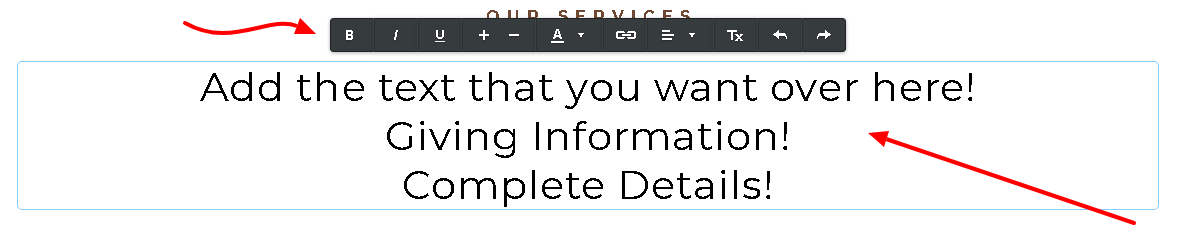 If you want you can even type multiple paragraphs in a single text element where it helps your users to read easily and it also looks clean. By doing so it will also help you in designing your pages. once you are in the text toolbar you can modify and write your text there. In the text toolbar, the icons are as follows-- bold your text, Italian text format, underline your text, make it bigger or zoom in, make it smaller or zoom out your text, Change the color of your text, creating a link, alignment-adjust of all text, put bulleted or numbered lists, and undo and redo of the text. Caution! - You have to be careful while editing your text and once if you've clicked outside the text box your changes will be saved automatically.
[ad_2]
Once you are done with selecting the theme for your website the next step is to add content to your website. Adding content means giving information to the people about your website and also being precise on what you are going to showcase to the public. Adding text content to your website is easy. Here at HostingSewa, we provide easy to build website builder to our customers with amazing features. All you need to take care of is about Title and Text.
Here on website builder from HostingSewa you can easily add and edit on your website. To add a title to your website you need to click on the title tab which you can see on your left side of your screen. And next, you can add your desired title for your website. And you also have to see that your title text is larger and more eye-catching than any paragraph text. Once you are done with the title next you need to add text content to your website where you are giving information about your website.
If you want you can even type multiple paragraphs in a single text element where it helps your users to read easily and it also looks clean. By doing so it will also help you in designing your pages. once you are in the text toolbar you can modify and write your text there. In the text toolbar, the icons are as follows-- bold your text, Italian text format, underline your text, make it bigger or zoom in, make it smaller or zoom out your text, Change the color of your text, creating a link, alignment-adjust of all text, put bulleted or numbered lists, and undo and redo of the text. Caution! - You have to be careful while editing your text and once if you've clicked outside the text box your changes will be saved automatically.
[ad_2]
Advertisement