
How Do I Increase The PHP Upload Limits in cPanel?
[ad_1]
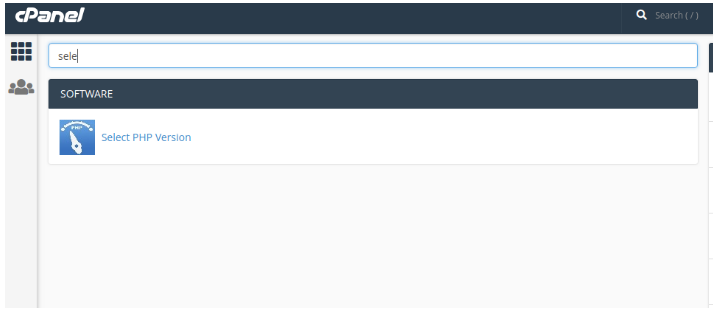
In this article, we will learn how to increase the PHP upload limit in the Cpanel. You can increase using Select a PHP version. Using this interface you can also change the PHP version which is required for the website and it also has a set of the most commonly-referenced configuration options for PHP. It will also help you to diagnose problems with how your web site handles PHP packages. PHP has several configuration options to limit resources consumed by scripts. By default, PHP is set to allow uploads of files with a size of 2MB or less. With default size, you will be only able to upload small files in webmail or with a PHP script, but larger files cannot be uploaded or you get "The page cannot be displayed" error when you push the "Send Message" button. While there are several ways to remove this cap on file size, we’ll be working with three settings within PHP that should deal with the upload limit. Let’s define the settings first so that you know what you’re actually doing. Upload_max_filesize: This defines the maximum upload limit for files. Post_max_size: This defines the maximum upload limit that will be handled in a POST request. Memory_limit: This defines how much memory is allocated for PHP. This number should be equal to or higher than upload_max_filesize. Steps to increase PHP Upload Limit and Post Max Size and Memory Limit: Step 1: Login to cPanel Server >> search for ‘Select PHP Version’
Step 2: click on select PHP version under software >> Click on ‘Switch To PHP Options’
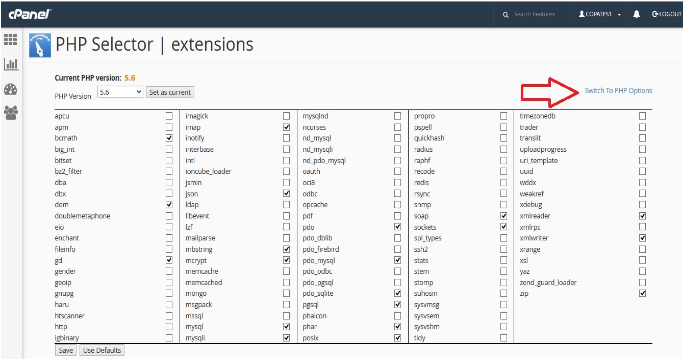 Step 3: After clicking on Switch to PHP Options >> then you need to set the following values and after making the changes remember to click on apply
Memory_limit : Set memory_limit to 256M. memory_limit describes the maximum amount of memory a script can allocate. It is recommended to set this to the maximum available value.
Upload_max_filesize: Set upload_max_filesize to 32M. upload_max_filesize describes the maximum size of an uploaded file. It must be larger than the theme file mentioned in the example.
Post_max_size: Set post_max_size to 64M. post_max_size has a similar functionality to upload_max_filesize. Make it larger than 19 MB (theme file) as well.
Step 3: After clicking on Switch to PHP Options >> then you need to set the following values and after making the changes remember to click on apply
Memory_limit : Set memory_limit to 256M. memory_limit describes the maximum amount of memory a script can allocate. It is recommended to set this to the maximum available value.
Upload_max_filesize: Set upload_max_filesize to 32M. upload_max_filesize describes the maximum size of an uploaded file. It must be larger than the theme file mentioned in the example.
Post_max_size: Set post_max_size to 64M. post_max_size has a similar functionality to upload_max_filesize. Make it larger than 19 MB (theme file) as well.
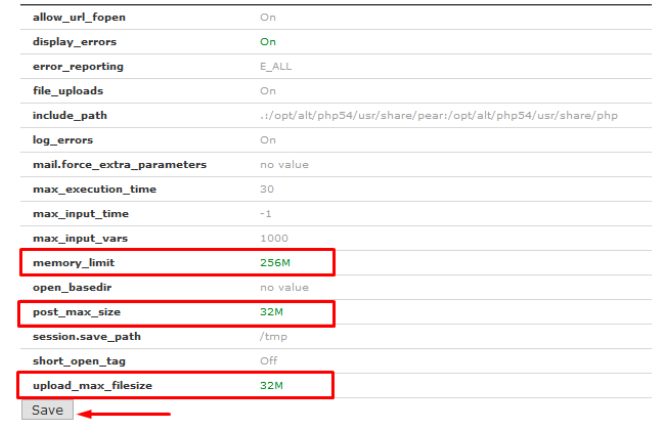 Step 4: After you do required changes >> Click ‘Save’ button to save the changes.
The other PHP directives that are provided by way the select PHP version interface are listed with their description for each of the directives :
file_uploads: You can specify whether the server should allow PHP scripts to receive files through HTTP.
include_path: Specifies the Directories for that they require & include, fopen(), file(), readfile(), and file_get_contents() functions query.
max_execution_time: his is used specify the max amount of time in seconds that the server should allow a PHP script to execute before the script is terminated, this is used to ensure that the server is not lacking or slow down because of poorly written scripts
max_input_time: this is used to specify the max time in seconds to process information which submit to PHP scripts like file uploads, and it ensures that server does not slow down or lacking because of overloaded scripts.
memory_limit: It is used to ensure that the server’s memory is not overload with poorly written script hence the maximum number of bytes of memory that script can use is specified. If the value is -1 then it indicates that no memory limit exists
upload_max_filesize: Specifies the maximum number of bytes which can be uploaded.
session.save_path: the path where the system stores visitors' unique user IDs and these IDs are used to store information about the user's session, or time spent on your website, using PHP you to create web content specific to a given visitor and session.
cPanel server change php.ini using the command line
You can change the PHP.INI config values by logging into to your command line, using SSH or putty program or directly logging into server console.
Once you login into your server in SSH, You will reach the bash prompt or shell.
You can find out the PHP.INI file using the following command
php -i | grep "php.ini"
Configuration File (php.ini) Path => /etc/php5/cli
Loaded Configuration File => /etc/php5/cli/php.ini
As you can see the loaded config file above, Edit it using an editor such as vim/emacs/nano and modify the desired values.
$ vim /etc/php5/cli/php.ini
You can write a simple test.php file with the following content to know the php.ini path.
When you execute the command, You will know the loaded php.ini file and edit it.
If you need any assistance, feel free to contact our technical team members as they are available 24/7 via phone call, email, ticket system or call out to our number.
Step 4: After you do required changes >> Click ‘Save’ button to save the changes.
The other PHP directives that are provided by way the select PHP version interface are listed with their description for each of the directives :
file_uploads: You can specify whether the server should allow PHP scripts to receive files through HTTP.
include_path: Specifies the Directories for that they require & include, fopen(), file(), readfile(), and file_get_contents() functions query.
max_execution_time: his is used specify the max amount of time in seconds that the server should allow a PHP script to execute before the script is terminated, this is used to ensure that the server is not lacking or slow down because of poorly written scripts
max_input_time: this is used to specify the max time in seconds to process information which submit to PHP scripts like file uploads, and it ensures that server does not slow down or lacking because of overloaded scripts.
memory_limit: It is used to ensure that the server’s memory is not overload with poorly written script hence the maximum number of bytes of memory that script can use is specified. If the value is -1 then it indicates that no memory limit exists
upload_max_filesize: Specifies the maximum number of bytes which can be uploaded.
session.save_path: the path where the system stores visitors' unique user IDs and these IDs are used to store information about the user's session, or time spent on your website, using PHP you to create web content specific to a given visitor and session.
cPanel server change php.ini using the command line
You can change the PHP.INI config values by logging into to your command line, using SSH or putty program or directly logging into server console.
Once you login into your server in SSH, You will reach the bash prompt or shell.
You can find out the PHP.INI file using the following command
php -i | grep "php.ini"
Configuration File (php.ini) Path => /etc/php5/cli
Loaded Configuration File => /etc/php5/cli/php.ini
As you can see the loaded config file above, Edit it using an editor such as vim/emacs/nano and modify the desired values.
$ vim /etc/php5/cli/php.ini
You can write a simple test.php file with the following content to know the php.ini path.
When you execute the command, You will know the loaded php.ini file and edit it.
If you need any assistance, feel free to contact our technical team members as they are available 24/7 via phone call, email, ticket system or call out to our number.
[ad_2]
In this article, we will learn how to increase the PHP upload limit in the Cpanel. You can increase using Select a PHP version. Using this interface you can also change the PHP version which is required for the website and it also has a set of the most commonly-referenced configuration options for PHP. It will also help you to diagnose problems with how your web site handles PHP packages. PHP has several configuration options to limit resources consumed by scripts. By default, PHP is set to allow uploads of files with a size of 2MB or less. With default size, you will be only able to upload small files in webmail or with a PHP script, but larger files cannot be uploaded or you get "The page cannot be displayed" error when you push the "Send Message" button. While there are several ways to remove this cap on file size, we’ll be working with three settings within PHP that should deal with the upload limit. Let’s define the settings first so that you know what you’re actually doing. Upload_max_filesize: This defines the maximum upload limit for files. Post_max_size: This defines the maximum upload limit that will be handled in a POST request. Memory_limit: This defines how much memory is allocated for PHP. This number should be equal to or higher than upload_max_filesize. Steps to increase PHP Upload Limit and Post Max Size and Memory Limit: Step 1: Login to cPanel Server >> search for ‘Select PHP Version’
Step 2: click on select PHP version under software >> Click on ‘Switch To PHP Options’
Step 3: After clicking on Switch to PHP Options >> then you need to set the following values and after making the changes remember to click on apply
Memory_limit : Set memory_limit to 256M. memory_limit describes the maximum amount of memory a script can allocate. It is recommended to set this to the maximum available value.
Upload_max_filesize: Set upload_max_filesize to 32M. upload_max_filesize describes the maximum size of an uploaded file. It must be larger than the theme file mentioned in the example.
Post_max_size: Set post_max_size to 64M. post_max_size has a similar functionality to upload_max_filesize. Make it larger than 19 MB (theme file) as well.
Step 4: After you do required changes >> Click ‘Save’ button to save the changes.
The other PHP directives that are provided by way the select PHP version interface are listed with their description for each of the directives :
file_uploads: You can specify whether the server should allow PHP scripts to receive files through HTTP.
include_path: Specifies the Directories for that they require & include, fopen(), file(), readfile(), and file_get_contents() functions query.
max_execution_time: his is used specify the max amount of time in seconds that the server should allow a PHP script to execute before the script is terminated, this is used to ensure that the server is not lacking or slow down because of poorly written scripts
max_input_time: this is used to specify the max time in seconds to process information which submit to PHP scripts like file uploads, and it ensures that server does not slow down or lacking because of overloaded scripts.
memory_limit: It is used to ensure that the server’s memory is not overload with poorly written script hence the maximum number of bytes of memory that script can use is specified. If the value is -1 then it indicates that no memory limit exists
upload_max_filesize: Specifies the maximum number of bytes which can be uploaded.
session.save_path: the path where the system stores visitors' unique user IDs and these IDs are used to store information about the user's session, or time spent on your website, using PHP you to create web content specific to a given visitor and session.
cPanel server change php.ini using the command line
You can change the PHP.INI config values by logging into to your command line, using SSH or putty program or directly logging into server console.
Once you login into your server in SSH, You will reach the bash prompt or shell.
You can find out the PHP.INI file using the following command
php -i | grep "php.ini"
Configuration File (php.ini) Path => /etc/php5/cli
Loaded Configuration File => /etc/php5/cli/php.ini
As you can see the loaded config file above, Edit it using an editor such as vim/emacs/nano and modify the desired values.
$ vim /etc/php5/cli/php.ini
You can write a simple test.php file with the following content to know the php.ini path.
When you execute the command, You will know the loaded php.ini file and edit it.
If you need any assistance, feel free to contact our technical team members as they are available 24/7 via phone call, email, ticket system or call out to our number.
[ad_2]
Advertisement